Federation · okta-with-hub-upstream
Add Thoryn Hub as an OIDC IdP in your existing Okta tenant
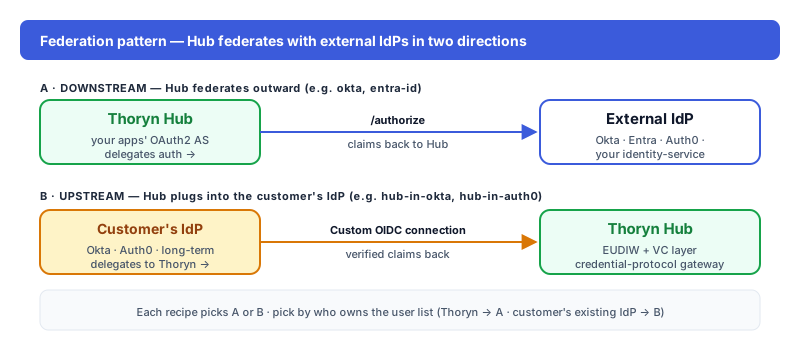
Customer keeps Okta as the user-facing IdP and adds Thoryn Hub as an upstream OIDC identity provider — the EUDIW + verifiable-credential gateway behind the Okta login. The reverse of `okta`.
- okta
- oidc
- idp
- hub-upstream
- eudi
Tested against:hub: 1.0.0okta: 2026 Q1
What this enables
The customer already runs Okta as their corporate IdP. Migration off Okta is years away — but they want Thoryn Hub as an upstream OIDC authentication source today. This recipe adds Thoryn Hub inside the Okta tenant as a third-party OIDC identity provider:
- Users land on the Okta login page (everything they're used to).
- They click Sign in with Thoryn.
- Okta redirects to Hub; Hub runs the OIDC authentication flow (including any configured step-up).
- Okta gets back a normalised OIDC profile and issues its own session.
Okta is the user-facing IdP. Hub is the OIDC authentication gateway behind it.
This is the inverse of okta, which has Hub federate to Okta. Pick the direction by who owns the user list — if it's Okta, use this recipe.
When to use
- Customer can't migrate off Okta but needs EUDIW / SD-JWT VC support
- Phased migration: ride along inside Okta first, decommission Okta later
- Multi-tenant SaaS where some customers want Thoryn-flavoured login on top of Okta
Prereqs
- Okta tenant URL (e.g.
https://YOUR-COMPANY.okta.com) - Okta Super Admin (Identity Providers UI is admin-only)
- A Thoryn account + Hub admin access
Step 1 — Register Okta as an OAuth2 client in Hub
hub clients create \
  --name "Okta tenant — YOUR-COMPANY" \
  --redirect-uri "https://YOUR-COMPANY.okta.com/oauth2/v1/authorize/callback" \
  --grant-types authorization_code,refresh_token \
  --scopes "openid email profile" \
  --client-type confidential
Capture client_id and client_secret — Okta will paste them in step 2.
Step 2 — Add Hub as an Identity Provider in Okta
Okta admin → Security → Identity Providers → Add Identity Provider → OpenID Connect IdP. Configure:
| Field | Value |
|---|---|
| Name | Thoryn Hub |
| Idp Usage | OAuth 2.0 |
| Client ID | (from step 1) |
| Client Secret | (from step 1) |
| Scopes | openid, email, profile |
| Issuer | https://hub.thoryn.org |
| Authorization endpoint | https://hub.thoryn.org/oauth2/authorize |
| Token endpoint | https://hub.thoryn.org/oauth2/token |
| JWKS endpoint | https://hub.thoryn.org/.well-known/jwks.json |
| Userinfo endpoint | https://hub.thoryn.org/userinfo |
Step 3 — Map Hub claims to Okta user profile
Identity Providers → Thoryn Hub → Profile. Map:
| Okta profile field | Hub claim |
|---|---|
email | email |
firstName | given_name |
lastName | family_name |
login | email (or preferred_username) |
For deployments that emit additional custom claims from Hub, define a matching custom Okta user-profile attribute and map it from the Hub claim.
Step 4 — Configure routing rules
Identity Providers → Routing Rules → Add Rule. Decide which users see "Sign in with Thoryn":
IF: User's domain is "thoryn-customer.example"
THEN: Use Thoryn Hub
Or expose it as an option on the Okta login page:
IF: User clicks "Sign in with Thoryn"
THEN: Use Thoryn Hub
Step 5 — Test
In an incognito window, visit the protected Okta-protected app. The Okta login page should show Sign in with Thoryn as an option. Clicking it redirects to Hub, where the user authenticates (and completes any configured step-up). Hub redirects back; Okta JIT-creates the user (or matches by email) and issues its own session.
Troubleshooting
invalid_redirect_uri: Okta auto-generates the callback URL (https://YOUR-COMPANY.okta.com/oauth2/v1/authorize/callback). Copy it from Okta's IdP screen and paste it into Hub admin exactly.Could not match user: JIT-create has to be enabled on the IdP, OR the email must already exist as an Okta user. Check Profile Sourcing settings.- Custom claims not flowing through: Hub emits custom claims based on its client + scope config. If a claim isn't appearing in Okta, verify it's actually present in the ID token (decode it at jwt.io); then check the Profile Mapping in Okta.
See also
okta— the inverse direction (Hub federates to Okta)hub-in-auth0— same pattern, Auth0- Hub — How it works
- Okta — OIDC IdPs docs