Federation · auth0-with-hub-upstream
Add Thoryn Hub as a Custom OIDC connection in your existing Auth0 tenant
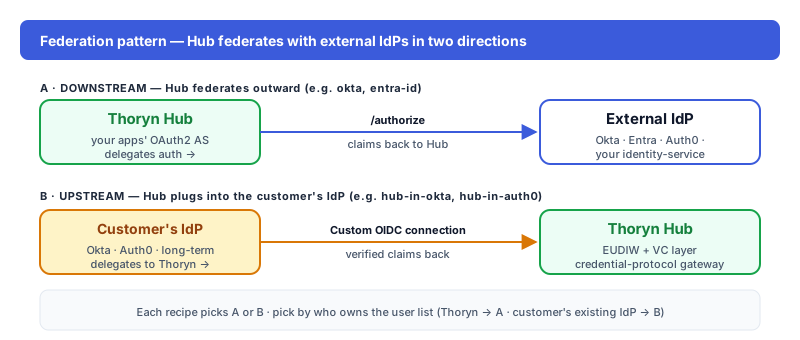
Customer keeps Auth0 as the user-facing IdP and adds Thoryn Hub as an upstream OIDC connection. The reverse of `auth0-as-source` — use it when migration is years away but EUDIW is needed today.
- auth0
- oidc
- idp
- hub-upstream
- eudi
Tested against:hub: 1.0.0auth0: 2026 Q1
What this enables
Customer's Auth0 tenant stays the user-facing IdP. Thoryn Hub is added as a Custom OIDC enterprise connection:
- Users hit the Auth0 Universal Login (or your customised login page).
- They pick Continue with Thoryn (or it's auto-routed by domain).
- Auth0 redirects to Hub; Hub runs the OIDC authentication flow (including any configured step-up).
- Auth0 receives a normalised OIDC profile and issues its own tokens to the relying party.
Auth0 owns the user database. Hub is the OIDC authentication gateway sitting upstream.
This is the inverse of auth0-as-source, which has Hub federate to Auth0 during a migration. Pick this recipe when Auth0 is staying long-term.
When to use
- Auth0 is the long-term IdP and migration is years away (or never)
- You need EUDIW / SD-JWT VC support inside an Auth0-managed flow
- Multi-tenant Auth0 where some tenants want Thoryn-flavoured credential login
Prereqs
- Auth0 tenant (
https://YOUR-TENANT.auth0.com) - Auth0 admin role (Connections is admin-only)
- A Thoryn account + Hub admin access
Step 1 — Register Auth0 as an OAuth2 client in Hub
hub clients create \
  --name "Auth0 tenant — YOUR-TENANT" \
  --redirect-uri "https://YOUR-TENANT.auth0.com/login/callback" \
  --grant-types authorization_code,refresh_token \
  --scopes "openid email profile" \
  --client-type confidential
Capture client_id and client_secret.
Step 2 — Add a Custom OIDC connection in Auth0
Auth0 dashboard → Authentication → Enterprise → Open ID Connect → Create Connection. Configure:
| Field | Value |
|---|---|
| Connection Name | thoryn-hub (URL-safe; users see it as ?connection=thoryn-hub) |
| Display Name | Thoryn |
| Issuer URL | https://hub.thoryn.org |
| Client ID | (from step 1) |
| Client Secret | (from step 1) |
| Type | Back Channel (Authorization Code) |
| Sync user profile | On (recommended — Auth0 refreshes profile claims on each login) |
Save. Auth0 fetches the OIDC discovery doc from Hub automatically — no need to paste individual endpoints.
Step 3 — Apply the connection to your Auth0 applications
For every Auth0 application that should expose "Continue with Thoryn":
Applications → YOUR-APP → Connections → toggle thoryn-hub to On.
Step 4 — Claim mapping
Auth0 normalises OIDC claims by default — email, given_name, family_name, name, picture all flow through with no config. For custom claims (EUDIW level, age_over_18, etc.), use an Auth0 Action to extract them from the upstream-IdP claims:
// Auth0 Action — onExecutePostLogin
exports.onExecutePostLogin = async (event, api) => {
  const upstream = event.user.identities?.find((i) => i.connection === "thoryn-hub");
  if (!upstream) return;

  const profile = upstream.profileData ?? {};

  if (profile.eudiw_verified) {
    api.user.setAppMetadata("eudiwVerified", true);
    api.user.setAppMetadata("eudiwLoa", profile.eudiw_loa ?? "medium");
  }

  if (profile.age_over_18 === true) {
    api.user.setAppMetadata("ageOver18", true);
  }
};
The metadata is then available as app_metadata.eudiwVerified everywhere downstream.
Step 5 — Test
Open a new private window, hit your Auth0 application's login page. The Universal Login should show Continue with Thoryn. Clicking it redirects to Hub, runs the OIDC authentication flow, returns to Auth0, and the user lands in your application with the upstream claims attached.
Troubleshooting
Connection is disabled for this application: each Auth0 application individually enables connections. Check Applications → YOUR-APP → Connections.User profile is empty: turn on "Sync user profile at each login" in the connection settings, or the upstream profile is captured only on first login.- Custom claims missing in
app_metadata: confirm the Action is bound to the Login flow and the upstream IdP is sending the expected claims. HTTP 400on connection creation: Auth0's OIDC connection only supports the Authorization Code grant. Make sure--grant-types authorization_codewas set when registering Hub's client.
See also
auth0-as-source— the inverse direction (Hub federates to Auth0 during a migration)hub-in-okta— same pattern, Okta- Hub — How it works
- Auth0 — Custom OIDC connections docs