Try it, then build with it
Spin up a verifier in 60 seconds.
Pick a scenario from the gallery, configure it in the console, and `docker compose up`. The demo-runner brings up the wallet-broker, a mock issuer, and a branded verification page on your laptop. Scan the QR with the EUDIW reference wallet — done.
Self-service. Local. Honest.
No 'request access' form, no calendar invite, no provisioning ticket. Pick a scenario, get a configuration bundle, run it. Walk away convinced (or back to your other tabs) in under five minutes. Every demo runs the same wallet-broker code path your production verifier would — what you see locally is what you ship.
Flow
Three steps from curious to verified
- Step 1
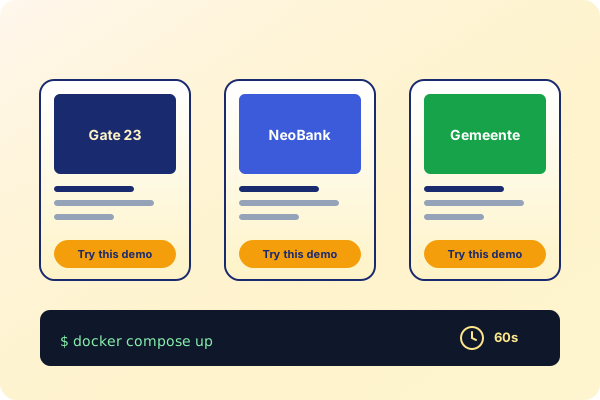
Pick a scenario. Browse the gallery — Gate 23 (door access), NeoBank (KYC), Gemeente (resident permit). Each ships a presentation definition, a mock issuer, and a styled verification page.
- Step 2
Configure in console. Click "Try this demo". The console mints an API key, generates a docker-compose bundle, and gives you a 60-second clip of the flow. Override the redirect URL or branding if you want.
- Step 3
`docker compose up`. One command. The runner brings up the broker plus a mock wallet, exposes the styled verification page on `localhost:3000`. Scan the QR; the mock wallet presents; verified claims appear.
See it run
60 seconds, end to end
30-second screencap of a demo verification round-trip — gallery → docker compose up → QR scan → verified claims
Protocols
Real protocols. Real broker. Real wallets.
OpenID4VP
Each demo ships a real OID4VP request_uri. Scan with the EUDIW reference wallet, the Animo wallet, or any wallet that implements the standard.
SD-JWT VC
The canned credentials are signed SD-JWT VCs with selective disclosure — same format your production issuer would mint.
mDoc / ISO 18013-5
Driving-licence demo uses real mDoc binary encoding so you can prototype against EUDIW's mobile-driving-licence rollout.
Same broker code path
The runner doesn't mock the broker. It runs the same JAR your production verifier would — only the issuer and wallet are local.
Privacy
Privacy posture, even for demos
A demo that ships customer data isn't a demo, it's a leak. Every scenario in the gallery is built to a privacy posture you'd ship to production.
- No PII in canned credentials — every demo uses synthetic data, names from open data sets, dates that don't map to a real person
- Containers are isolated per-demo; no cross-demo state leakage even when you run multiple gallery scenarios in parallel
- API keys are demo-scoped — they only authenticate against the single demo's session endpoint, never the broader product-api
- Logs stay local — nothing leaves your laptop unless you opt in by pointing a webhook URL outside the docker network
How it fits
The shortest path from curious to deployed
The demo-runner is the shortest path between "I'm curious about verifiable credentials" and "I have a working verifier on my laptop." Once you've run a demo, swap the mock wallet for a real one, the canned credential for your issuer, and you've shipped — same broker, same protocol, same code path.
- Pre-built scenarios cover the most common verification flows — KYC, age-gate, employment, physical access, government permits
- Cross-platform Docker — runs on macOS, Linux, and Windows (with WSL2). One command per demo.
- Same broker code path as production — what you test locally is what you ship to staging and prod
Next
After the demo
Wire what you saw into your application.
Demos guide
End-to-end walkthrough of the gallery, the configuration bundle, and the docker-compose layout.
Read the guide →
Broker product page
The verifier you just ran is Thoryn's wallet-broker. Here's everything else it does in production.
Explore Broker →
Pricing
Demos are free, no credit card. Production starts at — see the full tier breakdown.
View pricing →
Security review
EU-only infrastructure, no CLOUD Act exposure, ISO 27001 in progress. Read the full posture before you put credentials behind it.
Read security review →
FAQ
Frequently asked
- Does this work with real wallet vendors, or only the mock wallet?
- Both. The QR code is a standard OID4VP request_uri — scan it with the EUDIW reference wallet, the Animo wallet, or any wallet that implements OID4VP. The runner ships a 'mock wallet' CLI for headless testing in CI, but the user-facing flow uses your real wallet.
- How is this different from cloning the GitHub repo?
- It's a 60-second flow instead of a 30-minute one. The console pre-configures every secret — API keys, callback URLs, signing keys, wallet profile — so `docker compose up` is the only command you run. Cloning still works if you want to read the code; the demo-runner is for the prospect who hasn't decided to read it yet.
- Can I customise a demo?
- Yes. The console lets you override the presentation definition (which claims you ask for), the issuer's claims (what the credential says), the verification page branding (logo + copy), and the redirect URL. The bundle you download is a regular docker-compose project — fork it and check it into your repo.
Ready to spin up your first demo?
Free, no credit card. The console mints an API key and you're running in under a minute.