Federation · okta
Okta as a Hub federation member (OIDC)
Federate Hub to an Okta tenant. Okta authenticates the user; Hub issues the OAuth2 / OIDC tokens to your relying parties.
- okta
- oidc
- idp
Tested against:hub: 1.0.0okta: 2026 Q1
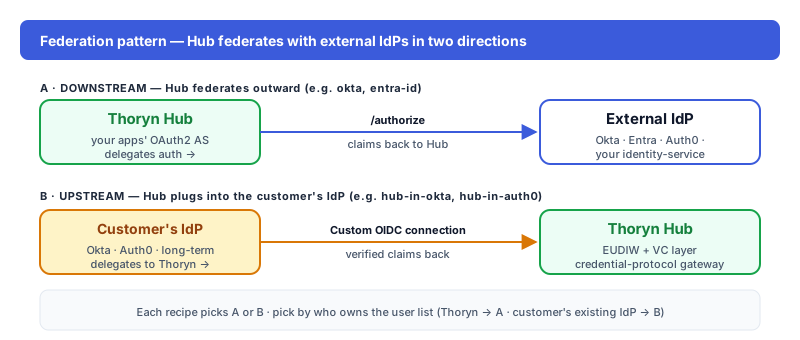
What this enables
Your customers' Okta identities sign into your app via Hub. Hub federates to Okta for authentication; the user lands in your app with a normalised OIDC profile.
Prereqs
- Okta tenant URL (
https://YOUR-COMPANY.okta.com) - Okta admin access to register an OIDC application
Step 1 — In Okta
Applications → Create App Integration → Sign-in method = OIDC → Web Application. Configure:
| Field | Value |
|---|---|
| Sign-in redirect URIs | https://hub.thoryn.org/login/oauth2/code/okta |
| Sign-out redirect URIs | https://hub.thoryn.org/logout |
| Grant type | Authorization Code |
Note the Client ID and Client Secret.
Step 2 — In Thoryn
# federation-member.yaml
id: okta
name: "Okta — YOUR-COMPANY"
type: oidc
issuer: https://YOUR-COMPANY.okta.com/oauth2/default
client_id: ${OKTA_CLIENT_ID}
client_secret: ${OKTA_CLIENT_SECRET}
scopes:
  - openid
  - email
  - profile
  - groups
claim_mappings:
  sub: sub
  email: email
  given_name: given_name
  family_name: family_name
  groups: groups
Step 3 — Test
Trigger a login from your app. Hub should redirect to Okta; after login, the user lands in your app with sub populated from Okta's sub claim.
Troubleshooting
- Group claim missing: Okta's default
groupsscope only includes regex-matched groups. In Okta → Authorization Servers → default → Claims → add agroupsclaim with filter "Matches regex.*". - Signing-algorithm mismatch: Okta defaults to RS256 — Hub accepts. If you've configured Okta to ES256, set
signing_alg: ES256in the federation-member YAML.
See also
hub-in-okta— the inverse direction (Hub inside an existing Okta tenant, used as an upstream OIDC IdP). Pick that one when Okta owns the user list.- Hub — How it works
- Okta — OIDC docs