Quickstarts · dotnet
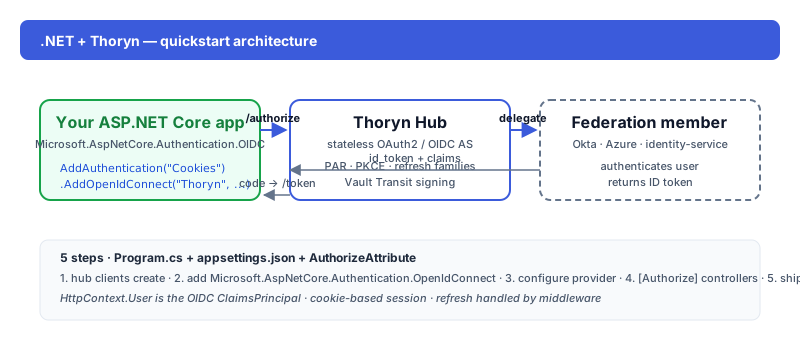
ASP.NET 8 — Hub login with `Microsoft.AspNetCore.Authentication.OpenIdConnect`
Wire OAuth2 / OIDC into an ASP.NET 8 app via the official OpenIdConnect handler. Five steps, ~20 lines of config.
- dotnet
- aspnet
- csharp
- oidc
Tested against:framework: ASP.NET 8.0oidcHandler: Microsoft.AspNetCore.Authentication.OpenIdConnect@8.0
Prereqs
- .NET 8+
- A Thoryn account
Step 1 — Register a confidential client
hub clients create \
  --name "My ASP.NET app" \
  --redirect-uri "https://localhost:7001/signin-thoryn" \
  --grant-types authorization_code,refresh_token \
  --scopes "openid email profile"
Step 2 — Add packages
dotnet add package Microsoft.AspNetCore.Authentication.OpenIdConnect
dotnet add package Microsoft.AspNetCore.Authentication.Cookies
Step 3 — Configure
Program.cs:
var builder = WebApplication.CreateBuilder(args);

builder.Services.AddAuthentication(options =>
{
    options.DefaultScheme = CookieAuthenticationDefaults.AuthenticationScheme;
    options.DefaultChallengeScheme = OpenIdConnectDefaults.AuthenticationScheme;
})
.AddCookie()
.AddOpenIdConnect("thoryn", options =>
{
    options.Authority = "https://hub.thoryn.org";
    options.ClientId = builder.Configuration["Thoryn:ClientId"];
    options.ClientSecret = builder.Configuration["Thoryn:ClientSecret"];
    options.ResponseType = "code";
    options.Scope.Add("email");
    options.Scope.Add("profile");
    options.SaveTokens = true;
    options.GetClaimsFromUserInfoEndpoint = true;
});

builder.Services.AddAuthorization();
builder.Services.AddRazorPages();

var app = builder.Build();
app.UseAuthentication();
app.UseAuthorization();
app.MapRazorPages();
app.Run();
Step 4 — Use the user
Pages/Index.cshtml.cs:
using Microsoft.AspNetCore.Authorization;
using Microsoft.AspNetCore.Mvc.RazorPages;

[Authorize]
public class IndexModel : PageModel
{
    public string? UserName => User.Identity?.Name;
    public string? Email => User.FindFirst("email")?.Value;
}
Step 5 — Run it
dotnet user-secrets set "Thoryn:ClientId" "..."
dotnet user-secrets set "Thoryn:ClientSecret" "..."
dotnet run
Hit https://localhost:7001 — [Authorize] redirects to Hub.
What's next
Troubleshooting
- Token not refreshing: confirm
SaveTokens = trueand that you're usingIAuthenticationService.GetTokenAsync. - HTTPS-only redirects: ASP.NET requires HTTPS for OIDC by default. Set up
dotnet dev-certsor use a non-HTTPS local profile only when developing.