Federation · linkedin
LinkedIn as a Hub federation member
Add LinkedIn social sign-in via OIDC. Two LinkedIn quirks shape the setup — email is a separate scope, sub is opaque per app.
- oidc
- social
- idp
Tested against:hub: 1.0.0linkedin: 2026 Q1
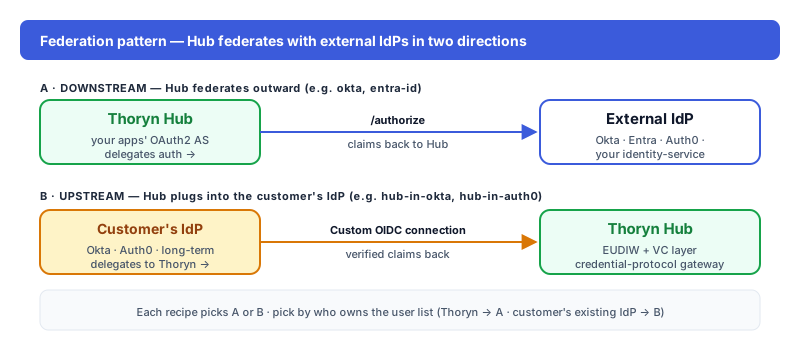
What this enables
LinkedIn users sign into your app through Hub. Hub federates to LinkedIn's "Sign In with LinkedIn using OpenID Connect" product; users land in your app with a normalised profile.
Common on professional and B2B platforms where LinkedIn is the user's primary work identity.
Prereqs
- A LinkedIn developer account at https://www.linkedin.com/developers/apps
- A company LinkedIn Page (required to create a developer app)
Step 1 — In LinkedIn
LinkedIn Developer Portal → Create app. Configure on the Auth tab:
| Field | Value |
|---|---|
| Authorised redirect URLs | https://hub.thoryn.org/login/oauth2/code/linkedin |
Copy the Client ID and Client Secret (the secret is hidden after creation).
On the Products tab, request access to Sign In with LinkedIn using OpenID Connect. Approval is typically instant.
Verify on the Auth tab that the OAuth 2.0 scopes include:
openidprofileemail
Step 2 — In Thoryn
id: linkedin
name: "LinkedIn"
type: oidc
issuer: https://www.linkedin.com/oauth
client_id: ${LINKEDIN_CLIENT_ID}
client_secret: ${LINKEDIN_CLIENT_SECRET}
client_authentication_method: client_secret_post  # LinkedIn rejects client_secret_basic
scopes:
  - openid
  - profile
  - email           # MANDATORY — LinkedIn returns no email claim without it
claim_mappings:
  sub: sub          # LinkedIn's per-app opaque ID; broker prefixes it as linkedin:<sub>
  email: email
  given_name: given_name
  family_name: family_name
  picture: picture
  locale: locale
Two LinkedIn-specific details baked into this config:
emailis its own scope. Most OIDC providers foldemailintoprofile; LinkedIn does not. Dropemailfrom the scope list and you'll see no email claim in the issued token — silently, with no error.client_secret_post, notclient_secret_basic. LinkedIn rejects basic-auth on/oauth/v2/accessTokenwith an opaque 401.
Step 3 — Test
Trigger a login. LinkedIn shows its consent screen; after the user approves, they land in your app with normalised claims. The broker sub is linkedin:<opaque-per-app-id>.
Troubleshooting
emailclaim missing: Either the developer app has not been approved for the Sign In with LinkedIn using OpenID Connect product, OR you droppedemailfrom the scope list. Check both.401 Unauthorizedon token exchange: You're usingclient_secret_basic. Switch toclient_secret_post.subchanges between environments: LinkedIn issues a differentsubper developer app. If your staging and production environments use different LinkedIn apps, the same user will have differentsubvalues. Useemail(whenemail_verified=true) as the cross-environment account-linking key.