Federation · keycloak
Keycloak as a Hub federation member
Self-hosted shops federate their Keycloak realm into Hub via standard OIDC. Common at developer-heavy customers and EU public-sector orgs.
- keycloak
- oidc
- idp
- self-hosted
Tested against:hub: 1.0.0keycloak: 26.x
What this enables
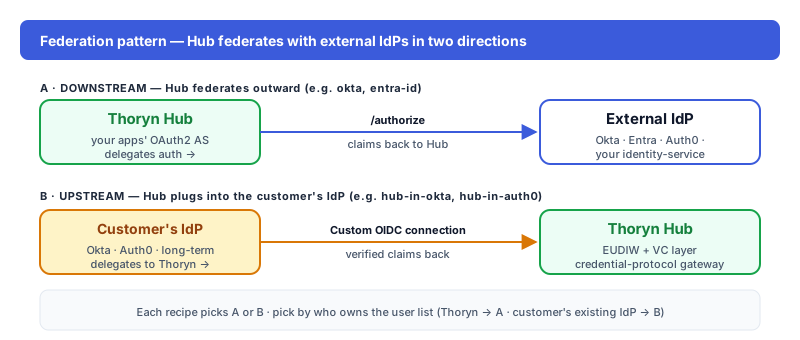
A self-hosted Keycloak realm federates with Hub. Useful when the customer already runs Keycloak as their internal IdP and doesn't want to migrate.
Prereqs
- Keycloak realm URL (
https://kc.customer.example/realms/<realm>) - Realm admin access
Step 1 — In Keycloak
Realm → Clients → Create. Configure:
| Field | Value |
|---|---|
| Client ID | thoryn-hub |
| Client authentication | On |
| Authentication flow | Standard flow (auth code) |
| Valid redirect URIs | https://hub.thoryn.org/login/oauth2/code/keycloak |
| Web origins | https://hub.thoryn.org |
After saving, switch to the Credentials tab and copy the client secret.
Step 2 — In Thoryn
id: keycloak
name: "Keycloak — customer realm"
type: oidc
issuer: https://kc.customer.example/realms/customer
client_id: thoryn-hub
client_secret: ${KEYCLOAK_CLIENT_SECRET}
scopes:
  - openid
  - email
  - profile
  - roles
claim_mappings:
  sub: sub
  email: email
  given_name: given_name
  family_name: family_name
  groups: realm_access.roles   # Keycloak nests roles under this path
Step 3 — Test
Hub redirects to Keycloak's login page; after auth, user lands in your app. Roles defined inside Keycloak appear in realm_access.roles.
Troubleshooting
- Group claim path: Keycloak nests realm roles deep in the token (
realm_access.roles). If you want client-specific roles, point atresource_access.<client-id>.roles. - Self-signed certificate: dev Keycloak instances often run on self-signed TLS. Hub rejects by default; add the IdP's CA cert to Hub's trust store, don't disable verification.