Federation · jumpcloud
JumpCloud as a Hub federation member
Federate Hub to a JumpCloud directory. The simplest of the seven pre-built connectors — JumpCloud uses one global OAuth issuer, so only client-id and client-secret are needed.
- jumpcloud
- oidc
- idp
Tested against:hub: 1.0.0jumpcloud: 2026 Q1
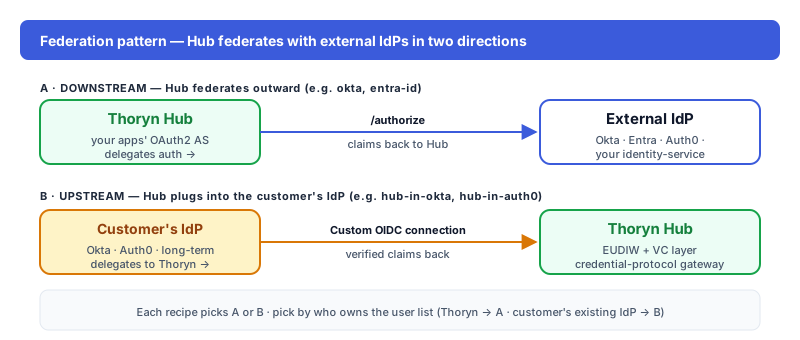
What this enables
Customers using JumpCloud sign into your app through Hub. Hub federates the auth; your app sees normalised OIDC tokens.
Prereqs
- JumpCloud Admin Console access
- Permission to create OIDC SSO applications in your JumpCloud organization
Step 1 — In JumpCloud
JumpCloud Admin Console → SSO Applications → Add New Application → Custom Application → OIDC. Configure:
| Field | Value |
|---|---|
| Display name | Thoryn Hub |
| Redirect URIs | https://hub.thoryn.org/login/oauth2/code/jumpcloud |
| Client Authentication Type | Client Secret Basic |
In the new application:
- SSO tab → copy the Client ID and Client Secret (the secret is hidden after creation).
- Attributes tab → confirm the Group attribute is mapped (default:
groups). - Save the application, then attach it to one or more User Groups (User Groups → your group → Applications).
Step 2 — In Thoryn
id: jumpcloud
name: "JumpCloud — ORG"
type: oidc
issuer: https://oauth.id.jumpcloud.com/
client_id: ${JUMPCLOUD_CLIENT_ID}
client_secret: ${JUMPCLOUD_CLIENT_SECRET}
scopes:
  - openid
  - email
  - profile
  - groups
claim_mappings:
  sub: sub          # JumpCloud's stable user GUID; broker prefixes it as jumpcloud:<sub>
  email: email
  given_name: given_name
  family_name: family_name
  groups: groups    # JumpCloud emits User Group display names (strings)
Unlike Entra (per-tenant URLs) and Okta (per-customer subdomains), JumpCloud's OAuth issuer is global — https://oauth.id.jumpcloud.com/ for every organization. The client_id is unique per JumpCloud org, so no separate tenant id is required.
Step 3 — Test
Trigger a login. JumpCloud prompts the user; after they enter their JumpCloud credentials, the user lands in your app with normalised claims. The broker sub is prefixed (jumpcloud:<user-guid>) so subjects don't collide with other federation members.
Troubleshooting
access_deniedon first login: The user is not in a User Group attached to the OIDC application. Open User Groups → your group → Applications and enable the SSO application.groupsclaim missing: Confirm the Group attribute is mapped on the application's Attributes tab AND thegroupsscope is requested.