Federation · entra-id
Microsoft Entra ID (Azure AD) as a Hub federation member
Federate Hub to an Entra ID tenant. Most-common enterprise scenario in DACH and the UK.
- entra-id
- azure-ad
- oidc
- idp
Tested against:hub: 1.0.0entraId: 2026 Q1
What this enables
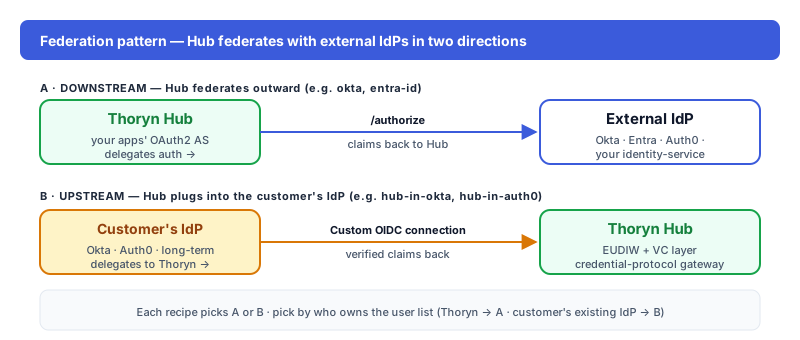
Customers using Microsoft Entra ID (Azure AD) sign into your app through Hub. Hub federates the auth; your app sees normalised OIDC tokens.
Prereqs
- Tenant ID (e.g.
12345678-1234-1234-1234-123456789012) - Entra admin access to create an App Registration
Step 1 — In Entra ID
Microsoft Entra → App registrations → New registration. Configure:
| Field | Value |
|---|---|
| Name | Thoryn Hub |
| Supported account types | Accounts in this organizational directory only (single tenant) |
| Redirect URI (Web) | https://hub.thoryn.org/login/oauth2/code/entra |
In the new app:
- Certificates & secrets → New client secret → copy the secret value (only shown once)
- API permissions → Microsoft Graph →
openid,email,profile,User.Read - Token configuration → Add optional claim → ID token →
email,family_name,given_name
Step 2 — In Thoryn
id: entra-id
name: "Microsoft Entra ID — TENANT"
type: oidc
issuer: https://login.microsoftonline.com/${TENANT_ID}/v2.0
client_id: ${ENTRA_CLIENT_ID}
client_secret: ${ENTRA_CLIENT_SECRET}
scopes:
  - openid
  - email
  - profile
claim_mappings:
  sub: oid          # Entra's stable user id
  email: email
  given_name: given_name
  family_name: family_name
  groups: groups    # only present if you enabled group claims
Step 3 — Test
Trigger a login. Entra prompts the user; after consent, user lands in your app with normalised claims. The oid claim (object ID) is the stable user identifier — prefer it over sub which can be tenant-scoped.
Troubleshooting
- Group claims missing: Entra needs explicit configuration. App registration → Token configuration → Add groups claim → Security groups → ID, Access, SAML.
- B2B guests: by default Entra's
emailclaim isn't populated for guest accounts. Map the optional claim or fall back toupn.