App connectors · App connectors
Slack — use Thoryn as the OIDC IdP
Pre-configured OIDC client for Slack. Customer pastes client_id/secret into Hub admin; Slack's custom IdP setup is filled in by claim.
- slack
- oidc
- communication
Tested against:hub: 1.0.0slack: 2026
What you get
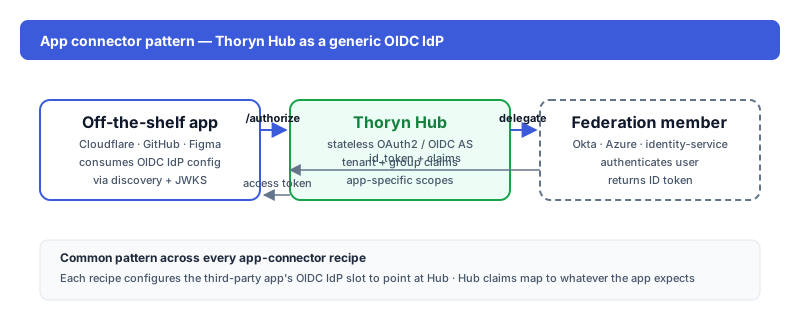
Slack accepts Thoryn-issued OIDC tokens for SSO into a Slack workspace. Users authenticate at Hub; Slack receives a normalised profile with email, given/family name, and (if you map it) group membership.
Setup
1. In Thoryn
hub clients create \
  --name "Slack" \
  --redirect-uri "https://YOUR-WORKSPACE.slack.com/sso/saml/start" \
  --grant-types authorization_code,refresh_token \
  --scopes "openid email profile groups"
Slack's OIDC IdP integration uses the standard authorization-code flow.
2. In Slack
Workspace Admin → Authentication → Add Custom OIDC IdP. Fill in:
| Field | Value |
|---|---|
| Discovery URL | https://hub.thoryn.org/.well-known/openid-configuration |
| Client ID | (from step 1) |
| Client Secret | (from step 1) |
| Default scopes | openid email profile |
3. Claim mapping
Slack expects these claims:
| Slack field | Thoryn claim |
|---|---|
email | email |
given_name | given_name |
family_name | family_name |
name | computed (given + family) |
4. Test
Open https://YOUR-WORKSPACE.slack.com/sso/saml/start in an incognito window. Slack should redirect to Hub; after authentication, the user lands in Slack as the matched email.
Caveats
- Slack Free + Pro plans don't support custom OIDC. You need at least Slack Business+ or Enterprise Grid.
- Workspace email must match the
emailclaim issued by Hub.