App connectors · App connectors
Salesforce — use Thoryn as an OpenID Connect Auth Provider
Configure Salesforce to accept Thoryn-issued OIDC tokens. Works with Sales Cloud, Service Cloud, Experience Cloud.
- salesforce
- oidc
- crm
Tested against:hub: 1.0.0salesforce: Spring '26
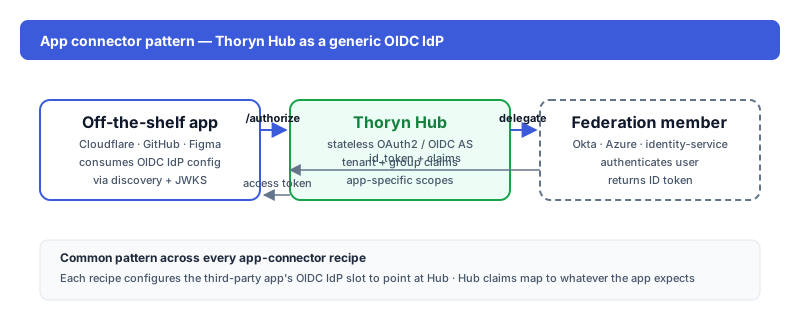
What you get
Thoryn-authenticated users sign into Salesforce orgs as the matched user (or auto-provisioned via JIT). Email, name, and (optionally) profile/role mapping flow through claim mappings.
Setup
1. In Thoryn
hub clients create \
  --name "Salesforce" \
  --redirect-uri "https://YOUR-DOMAIN.my.salesforce.com/services/authcallback/Thoryn" \
  --grant-types authorization_code,refresh_token \
  --scopes "openid email profile"
2. In Salesforce
Setup → Identity → Auth. Providers → New → OpenID Connect. Configure:
| Field | Value |
|---|---|
| Provider name | Thoryn |
| URL Suffix | Thoryn |
| Consumer Key | (from step 1) |
| Consumer Secret | (from step 1) |
| Authorize Endpoint URL | https://hub.thoryn.org/oauth2/authorize |
| Token Endpoint URL | https://hub.thoryn.org/oauth2/token |
| User Info Endpoint URL | https://hub.thoryn.org/userinfo |
| Default Scopes | openid email profile |
3. Just-in-time provisioning
Set the registration handler to a custom Apex class that maps Thoryn claims to Salesforce User fields. Minimal mapping:
public class ThorynRegistrationHandler implements Auth.RegistrationHandler {
  public User createUser(Id portalId, Auth.UserData data) {
    User u = new User();
    u.Email = data.email;
    u.FirstName = data.firstName;
    u.LastName = data.lastName;
    u.Username = data.email + '.thoryn';
    u.Alias = data.firstName.left(1) + data.lastName.left(7);
    u.ProfileId = [SELECT Id FROM Profile WHERE Name='Standard User'].Id;
    return u;
  }
}
Caveats
- My Domain required: Salesforce orgs must have My Domain enabled before any Auth Provider works.
- Profile assignment: assigning a Profile inside the registration handler is mandatory; Salesforce won't create a User without one.